Manual
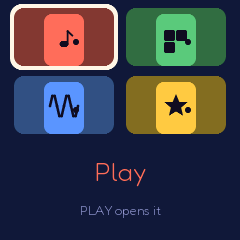
BOP-1 turns the M-VAVE FM-1 into a music toy for children that is also a real synthesizer. Switch it on and music plays. Nothing a child can press sounds wrong, and every knob changes something they can see: a friend whose body is the sound. The same toy grows with the child, through four doors: Play (age 3 and up: press things), Make (6 to 8: beats, loops, songs), Lab (9 to 12 and up: a real subtractive synth with its real names, and lessons) and Games. This manual is for the grown-ups; the children need none of it.
1Install
Try it first: the browser emulator runs the same code with sound, played with the mouse, a touch screen or the keyboard.
Install from the browser: open the web installer in Chrome or Edge, connect the FM-1 with a USB data cable and press Install. Don't unplug it while it's writing; when it finishes, the FM-1 restarts into BOP-1 and plays.
Install from the command line: download bop1-X.Y.Z.fwsc from the latest release, install Python 3 with pip3 install mido python-rtmidi, and from the BOP-1 source run:
python3 tools/fm1_install.py bop1-X.Y.Z.fwscWhich version: the start screen shows it under the name, and the grown-ups' page at the bottom (About).
Go back: "Back to the stock firmware", at the bottom of the installer page, puts M-VAVE's firmware back (download the FM-1 V15 file from the link there, choose it, press the button). M-VAVE's own updater, M-UPGRADE, works too.
Installing other firmware is at your own risk. If the FM-1 ever won't start, see Recovering an FM-1 that won't start.
Coming from another firmware: BOP-1 keeps its settings where other firmwares keep theirs, under its own name, and its songs, My Friends and the sticker book in the FM-1's main store (where some firmwares keep samples or patterns). It never reads another firmware's: it starts fresh, and its first save replaces what was kept there.
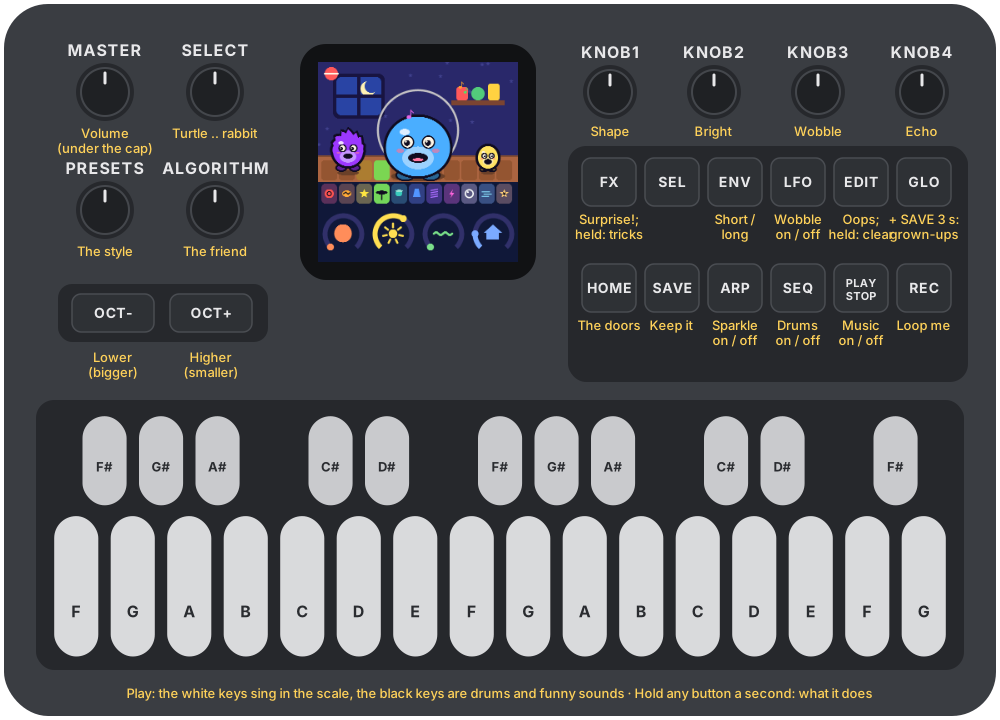
The stickers: the FM-1's buttons carry synthesizer names (ALGORITHM, ENV, LFO...). For children who don't read yet, print the sticker overlay on sticker paper: a picture for each button and knob (what it does in Play), and the eleven pads for the black keys.
2Getting started
Before you hand it over (two minutes):
- Turn MASTER (the volume, top left) to the middle.
- Hold GLO and SAVE together for three seconds: the grown-ups' page opens. For a child of three or four, set Doors shown to Play only (then HOME does nothing and they can't get lost). Check the Volume cap (70 % to start). Press HOME to close it.
- That's all. Everything else is there to be found.
The first five minutes, together:
- Switch it on. A song is already playing; the friend in the middle sings along.
- Press the white keys: the friend sings, and every note fits the song. Press the black keys: drums and funny sounds.
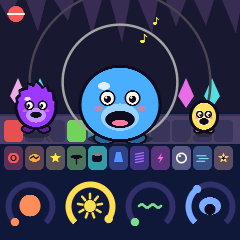
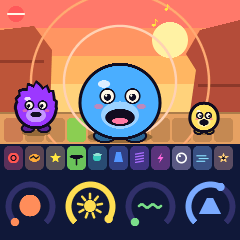
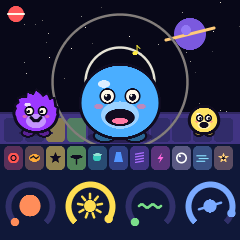
- Turn the four knobs on the right: the friend changes shape (knob 1), opens its mouth (knob 2, the sound gets brighter), wobbles (knob 3), and the room grows from a bedroom to outer space (knob 4, the echo).
- Turn ALGORITHM for another friend, PRESETS for another style of music (the place changes), SELECT for slower or faster (a turtle or a rabbit).
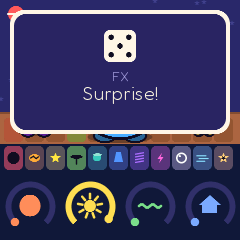
- Press FX: Surprise! A new song. Hold FX and press a white key: a magic trick while it's held.
- Press REC and play: what you play goes round with the song ("Loop me"). REC again to stop.
- Hold any button for a second: a card shows what it does.
3The friends
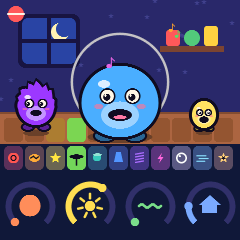
Every sound in BOP-1 is a friend, and the friend's body is the sound. Each control has one meaning, the same in every door:
| The sound | The friend |
|---|---|
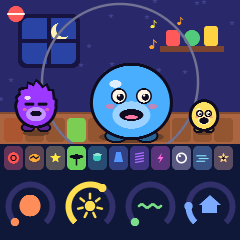
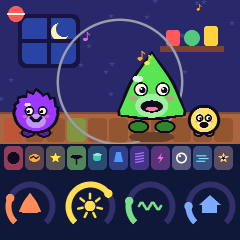
| The waveform | Its body: sine a round blob, triangle pointy, saw spiky with a zig-zag back, square a boxy robot with an antenna, noise a fuzzy cloud; turn slowly and it morphs |
| The pitch | Its size: low is big, high is small (OCT− and OCT+); each note makes it bob |
| The filter's cutoff | Its mouth: closed and dark ("mmm") to wide open and bright ("aah"), which is how a "wah" works |
| The envelope | It hops up as a note starts (the attack: how fast) and settles (the release: how slowly it lands) |
| The LFO | It wobbles at the LFO's speed: bobbing up and down (pitch: vibrato), its mouth flapping (filter: wah), fading in and out (volume: tremolo) |
| Echo and reverb | Its place: a bedroom, a cave, a canyon, outer space, with rings going out after each note |
| The drums | The floor: a tile lights for each pad; the kick shakes the ground |
| Friend | Its sound |
|---|---|
| Bloop (blue) | A sine: round and soft |
| Pointy (green) | A triangle: a flute, with a vibrato |
| Zig (orange) | A saw: a bright lead, two oscillators a little apart |
| Bit (silver) | A square: a robot, a little crushed |
| Wub (purple) | The bass monster: a saw over a sub-octave |
| Twinkle (yellow) | Two oscillators a fifth apart, like a bell |
| Bubbles (aqua) | A resonant pluck |
| Fizz (pink) | Noise through a ringing filter: wind, waves, rain |
  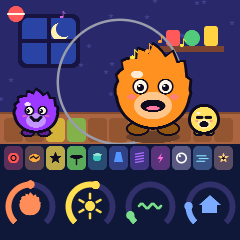 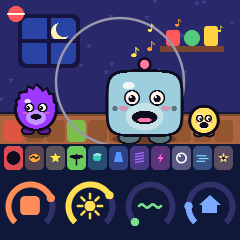
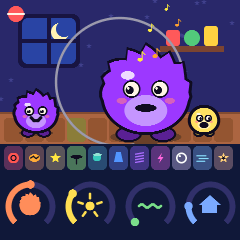 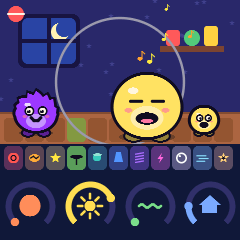 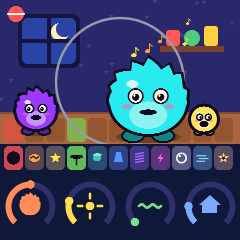 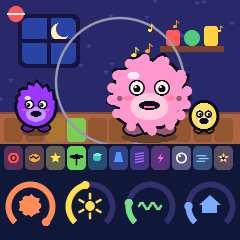




Sounds made in the Lab and kept as My Friends (up to eight, each with its colour) join them in every door.
4Everywhere
| PLAY | The music on and off (in Games: hear it again) |
| HOME | The doors: a white key (1 Play, 2 Make, 3 Lab, 4 Games) or ALGORITHM picks one, the same key again or PLAY opens it; HOME again goes back |
| Hold a button | After a second, a card says what it does in this door (the Make and Lab cards add a sentence; the Lab's the real term) |
| EDIT | Oops: undoes the last big change (a loop, a Surprise, a cleared layer, a song opened). Held two seconds, a ring fills and it clears (Play: my loop; Make: this layer in this part; Lab: the friend's sound back) |
| SAVE | Keep this song: eight places, shown as their friends; a white key picks one. Turn ALGORITHM there to open a kept song instead (in the Lab, SAVE keeps the sound as a friend) |
| GLO + SAVE, 3 seconds | The grown-ups' page |
| OCT− + OCT+, 5 seconds | Update mode (for the installers) |
Nothing is deleted with a tap, and no screen can strand anyone: HOME always goes home.
  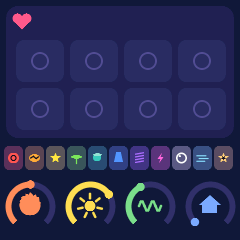

5Play
Ages 3 and up. No reading needed.
The music is already playing when it switches on: a song made by BOP-1 in the style chosen. The friend sings the tune; its band plays along: the bass friend on the left, the sparkle friend on the right, the drums on the floor. When a child plays, the friend's own tune steps aside to let them sing, and the key lights show the song's tune, so they can play along with the lights. The playhead runs dimly across the white keys.
| Control | Does | On the screen |
|---|---|---|
| White keys | The friend sings, in the scale (pentatonic: no wrong notes, about three octaves) | Notes fly out, coloured by their names |
| Black keys | Kick, snare, clap, hat, tom, cowbell, boing, laser, pop, whoosh, ta-da: louder than the song's own, which steps back a moment to let them through | A tile lights on the floor |
| ALGORITHM | The friend (the eight, then My Friends) | A new friend slides in |
| PRESETS | The style: Bounce, March, Robot, Space, Lullaby, Dino Stomp, Jungle Party, Disco (a new song in it, the friend kept) | The style's badge, top left |
| SELECT | Slower or faster | A turtle and a rabbit |
| Knob 1 Shape | The waveform: sine, triangle, saw, square, noise | The body changes shape |
| Knob 2 Bright | The filter: dark to bright | The mouth closes or opens |
| Knob 3 Wobble | The LFO (its speed follows) | It wobbles |
| Knob 4 Echo | Echo and reverb | Bedroom, cave, canyon, space |
| ENV | Short, medium or long notes (a plink, normal, a swell) | It hops, walks or floats |
| OCT− / OCT+ | An octave lower or higher | Bigger or smaller |
| SEQ | The song's drums on or off (the black keys still play) | |
| ARP | The sparkle on or off; with it on, the keys held run up and down | |
| LFO | The wobble on or off | |
| FX | Surprise! A new song in the same style (the friend and my loop kept) | A dice rolls |
| FX held + white key 1–8 | A trick while held: chipmunk, giant, robot, stutter, slow-mo, wah, rise, drop | |
| REC | Loop me: what you play (keys and pads) goes round over the song, two bars, in time; REC again to stop; again to add more | A red dot, the loop going round |
| EDIT | Oops (the last loop goes); held: my loop cleared | |
| SAVE | Keep this song |
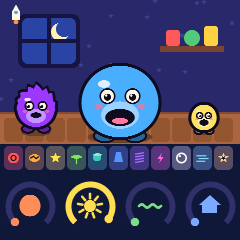
The places: knob 4 takes the friend from a bedroom at night (a little echo) to a cave, a canyon at sunset and outer space (the most).

6Make
Ages 6 to 8. Beats, loops and songs.
A song has four layers, like four friends in a band: Beats (the drums), Bass, Tune (the friend) and Sparkle (arpeggios and chords). It has four parts, A B C D, each one bar long, played in a chain; each part has its own chord, from the song's chords (happy, sad, brave or sleepy). The Bass and the Sparkle follow the chords by themselves, so a line written once fits every part.
Make works on the song Play was playing (switch doors and it's the same song); SAVE keeps it.
| Control | Does |
|---|---|
| ALGORITHM | The layer: Beats, Bass, Tune, Sparkle (the tabs at the top) |
| PRESETS | Its friend (on Beats: the drum) |
| SELECT | The tempo |
| Knobs 1–4 | Shape, bright, wobble, echo, as in Play (on Beats: the drum's tune and length, the swing, the echo) |
| Beats: black keys | Pick the drum (and play it) |
| Beats: white keys | Its sixteen steps, on and off; ENV + a step: a loud one |
| Bass, Tune, Sparkle: keys | Play (in the scale); the black keys play the drums along |
| SEQ | The white keys become the sixteen steps: a tap puts the last note played on that step, or takes it away; hold a step and turn knob 1 for its note (along the scale), knob 2 for its length |
| REC | Records what you play into this layer of this part, in time; REC again to stop |
| FX | Help me: a new idea for this layer |
| SEL | This layer quiet, or back (its tab crossed out) |
| ENV · LFO · OCT | Short or long notes · the wobble · an octave down or up |
| ARP held + white keys 1–4 | The part to work on (it plays round and round); press several in a row (A A B A...) and let go: a song, played as a chain |
| GLO held + white keys 1–4 | The chords: happy (I–V–vi–IV), sad (vi–IV–I–V), brave (I–IV–V–I), sleepy (I–vi–IV–V) |
| GLO tapped | Hear this part alone, or the whole song |
| EDIT | Oops; held: this layer cleared in this part |
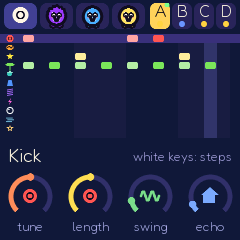 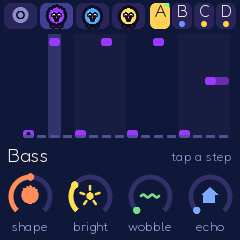 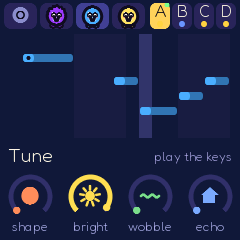

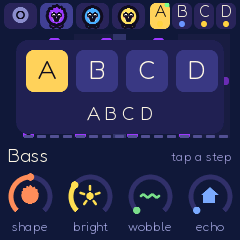 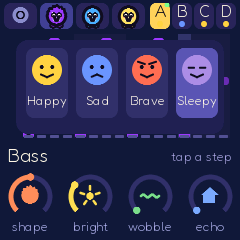
The key lights show the steps (the playhead runs through them) and, on Beats, the drum chosen.
7Lab
Ages 9 to 12 and up. The real synth, by its real names.
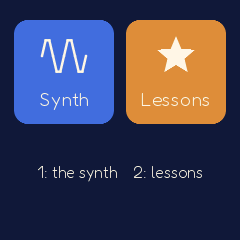
The Lab's first screen offers the synth (white key 1) or the lessons (white key 2; see 8).
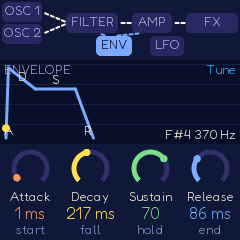
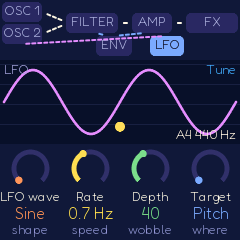
At the top, the signal flow: OSC 1 and OSC 2 into the FILTER, into the AMP, into the FX, with the ENVELOPE and the LFO drawn as wires to what they move. The page open is lit. Under it, a live scope shows the wave at that stage (after the oscillators, after the filter, after the amp), with the stage before it ghosted, so the filter can be seen rounding off a saw. The envelope's page draws its shape, the LFO's its wave. Each knob shows its real name, its value, and the toy's word ("Cutoff / 2.8 kHz / bright").
| Page (button) | Knob 1 | Knob 2 | Knob 3 | Knob 4 |
|---|---|---|---|---|
| Oscillators (SEL) | OSC 1 wave | OSC 2 wave | OSC 2 tune (semitones) | Mix 1 to 2 |
| ... again (SEL) | Sub-octave | Detune | Glide | Level |
| Filter (SEQ) | Cutoff | Resonance | Type (low, band, high pass) | Envelope amount |
| ... again (SEQ) | Key tracking | Envelope amount | Cutoff | Resonance |
| Envelope (ENV) | Attack | Decay | Sustain | Release |
| LFO (LFO) | Wave (sine, triangle, square, random) | Rate | Depth | Target: pitch, filter, volume |
| Arpeggiator (ARP) | Pattern (up, down, up and down, random) | Rate | Octaves | Glide |
| Effects (FX) | Echo time | Echo repeats | Reverb | Robot (bit-crush) |
| Control | Does |
|---|---|
| ALGORITHM | The layer whose sound you make: Tune, Bass, Sparkle |
| PRESETS | A friend (or one of My Friends) onto it, to start from |
| Keys | Play it, in the scale; GLO switches to a piano (every key its real note; the screen shows its name and frequency) |
| OCT− / OCT+ | An octave down or up (half or twice the frequency) |
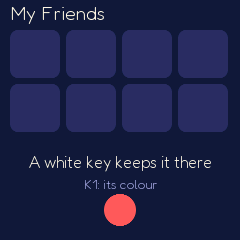
| SAVE | Into My Friends: a white key picks the place, knob 1 its colour; it then plays in Play and Make |
| EDIT | Oops; held: the friend's own sound back |
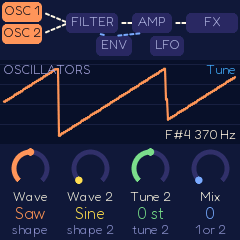 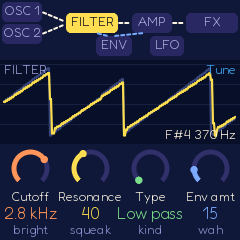 


The Lab lets the resonance ring all the way (a squeal) unless the grown-ups' page says Lab squeals: never; in Play and Make it is always held back.
8Lessons
Behind the Lab door (key 2 on its first screen): ten short lessons, each a few picture cards and a try it the firmware checks. OCT+ goes to the next card (after a try-it, once it's done), OCT− back. Finishing one puts a sticker in the sticker book. The synth stays playable under them.
| Lesson | Try it | |
|---|---|---|
| 1 | What is sound? A wiggle in the air | Play a key and watch the wiggle |
| 2 | High and low: fast and slow wiggles, the frequency | A high key, then a low one |
| 3 | Shapes of sound: the same note, another wave | Knob 1 (Wave) to Square |
| 4 | The filter: taking the fizz out; resonance | Cutoff all the way down; then Resonance up |
| 5 | Envelopes: how a sound starts and stops | Attack up: a slow start |
| 6 | The LFO: a hand that keeps turning a knob | Depth up, and play |
| 7 | Two oscillators: detune makes it fat, a fifth bright | Detune up |
| 8 | Beats and steps: sixteen steps, the kick on 1 | White keys 1, 5, 9, 13 |
| 9 | Scales: the pentatonic, major and minor | Five different notes |
| 10 | Chords and songs | Three keys at once |
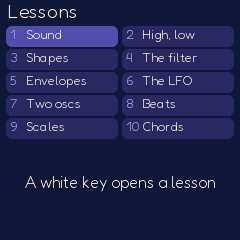 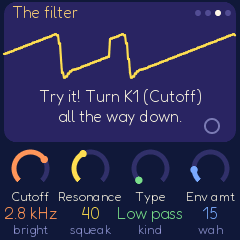
The printable lesson cards give each one as a classroom activity too, with and without the FM-1, and the real words to learn.
9Games and the sticker book
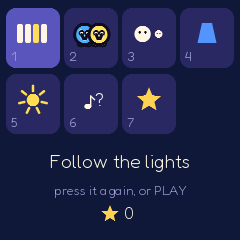
White keys 1–6 pick a game (the same key again, or PLAY, starts it), 7 the sticker book. PLAY in a game hears it again; HOME leaves. The song stops while the games play, and its sounds come back after.
| Game | Teaches | How |
|---|---|---|
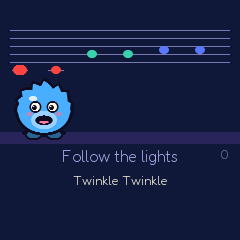
| 1 Follow the lights | Melody, the keyboard | A key lights: press it, and the tune comes out. Twinkle Twinkle, Hot Cross Buns, Mary Had a Little Lamb, Frère Jacques, Row Row Row Your Boat, Old MacDonald, Ode to Joy, Happy Birthday. A staff with coloured notes for those who read. No timer. |
| 2 Copy me | Memory, pitch | The friend sings notes on four lit keys; sing them back; one more each time |
| 3 High or low? | Pitch | Two notes: OCT+ if the second is higher, OCT− if lower (the big and small friends say so) |
| 4 Beat copy | Rhythm | Hear a rhythm on the cowbell, four clicks, then tap it on any black key |
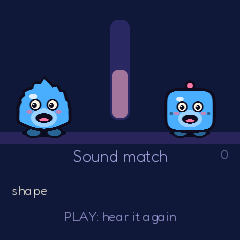
| 5 Sound match | Synthesis | Turn the knobs until your friend sounds like the other (PLAY hears it): warm, warmer, hot. Shape first; then bright, short or long, and wobble as it goes on |
| 6 Name the friend | Timbre | Hear a sound; which of the three friends made it? |
Each game gives one to three stars (always at least one); every five stars a new sticker. The sticker book holds the eight friends, the eight styles and the ten lessons' stars. Nothing is ever taken away (only the grown-ups' page can reset it).

10The grown-ups' page
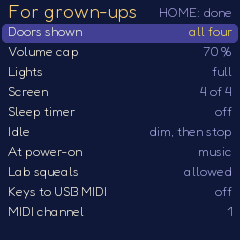
Hold GLO and SAVE together for three seconds. SELECT (or ALGORITHM) moves, knob 1 (or PRESETS) changes, HOME closes it and keeps the settings.
| Setting | Choices | |
|---|---|---|
| Doors shown | Play only, + Games, + Make, all four | Play only: HOME does nothing |
| Volume cap | 10–100 % (70 %) | The most the output can ever reach, whatever MASTER says |
| Lights | full, calm, off | Calm: no flashes, no chases, no button pulses; off: only PLAY |
| Screen | 1–4 | Brightness |
| Sleep timer | off, 5, 10, 20, 30 minutes | From switching on: the music stops and the screen dims (after half a minute untouched). Any key wakes it. Bedtime: pick the Lullaby style first |
| Idle | dim, then stop / always on | The screen dims after two minutes untouched; the music stops after ten |
| At power-on | music / quiet | |
| Lab squeals | allowed / never | Never: the Lab holds the resonance and the highest notes back too |
| Keys to USB MIDI | on / off | The notes played, to a computer |
| MIDI channel | 1–16 | |
| MIDI clock | follow / lead | Follow another's clock, or send ours |
| Tune | ±50 cents | |
| Reset: songs, My Friends, sticker book | hold SAVE 3 s | Each on its own |
| About | The version, the battery reading, how to reach update mode |
11Safety
- The volume cap limits the output, and an always-on limiter keeps it under the cap whatever the MASTER knob, the song or the effects do (a test checks it at every setting, on the heaviest song).
- No squeals: in Play and Make the filter's resonance is held well below self-oscillation and the highest notes are folded down an octave. The Lab can go further unless the grown-ups' page says never.
- A gentle start: the sound fades in at power-on and after a sleep.
- Flashes: whole-screen and whole-panel light flashes are limited to three a second (the WCAG 2.3.1 threshold); with Lights: calm there are none, and no chases. A test measures every scene's brightness frame to frame and fails above the limit.
- Nothing lost by a tap: EDIT is undo; clearing needs EDIT held two seconds, the resets three.
- No reading needed in Play; the picture quick-start and the stickers help the youngest.
12The lights
| Where | The keys | The buttons |
|---|---|---|
| Play | The song's tune (play along), the keys held, the playhead dimly | Pulse with the kick (at most three a second); SEQ, ARP, LFO lit when on; PLAY green, red while Loop me records |
| Make | The steps of the layer (the playhead through them), the drum chosen | The layer's state |
| Lab | The keys held | The page's button bright, the other pages dim |
| Games | The next note (Follow the lights), the choices (Copy me, Name the friend) |
A rainbow runs across the keys at power-on, after Surprise! and when stars are won (not with Lights: calm).
13MIDI
USB and the TRS MIDI input (with the FM-1's adapter): notes on any channel play the friend; channel 10 plays the pads (General MIDI drum notes: kick 36, snare 38, clap 39, hat 42, tom 45, cowbell 56, and 49, 51, 37, 46, 57 for the funny sounds). MIDI clock in drives the song (MIDI clock: follow), or BOP-1 sends its own (lead). With Keys to USB MIDI on, the notes played go out on the channel chosen.
14Saving
- The song (the one playing and being made) is kept by itself, a few seconds after a change when the music is stopped, and when changing doors; switching off and on comes back to it.
- Eight kept songs: SAVE shows them; a white key keeps the song there. Turn ALGORITHM or PRESETS and the same screen opens one instead (a white key: that song). EDIT undoes an open.
- My Friends (eight sounds) and the sticker book are kept as they change.
Saving to the FM-1's memory takes a moment in which the sound pauses, so BOP-1 saves while the music is stopped, or when asked.
15Troubleshooting
Update mode: hold OCT− and OCT+ together for five seconds. A countdown appears; let go before it ends to cancel.
Calibration: if a button or knob does the wrong thing, hold OCT− and OCT+ while you switch the FM-1 on. The screen then asks you to press each button and turn each knob in turn.
Clicks or dropouts: the most BOP-1 can be asked for is every pad on every step with chords on every step and every effect up. If the FM-1 ever runs short, BOP-1 plays fewer notes at once (the tune first, then the sparkle, then the pads) until it has time again.
After a crash: BOP-1 shows a red CRASH screen and restarts by itself a few seconds later. The next start shows RESTARTED AFTER A CRASH and an address (PC ...) for a moment. If you report the problem, include that address and what was happening.
Safe mode: if BOP-1 crashes twice in a row while starting, it starts in SAFE MODE instead. There's no sound, but USB works, so the web installer can reach it: reinstall BOP-1, or put the stock firmware back from the same page. Press PLAY to try starting BOP-1 normally again. If even safe mode fails twice, the FM-1 drops into the chip's own update mode, and only the rescue below can reach it.
Recovering an FM-1 that won't start
An FM-1 in the chip's own update mode shows a blank screen, and neither the web installer nor M-VAVE's updater can see it. A script in the BOP-1 source puts M-VAVE's firmware back, on a Mac, with the USB cable you already have. In Terminal, from the BOP-1 folder:
bash tools/fm1_rescue.sh- If a window asks to install the command line developer tools, click Install. When it has finished, run the line again.
- If it asks for a password, type your Mac password (nothing shows as you type) and press Return.
- When it says it's waiting, plug the FM-1 in and switch it on. The script catches it, checks the chip, saves a backup of the FM-1's memory in the
fm1-rescuefolder in your home folder, and asks before it writes anything. - Type yes and press Return. Don't unplug anything until it says it's restarting the FM-1. The FM-1 then starts into its original firmware, and you can install BOP-1 again from there.
The script downloads M-VAVE's FM-1 V15 firmware and JieLi's flash loader, and checks both against known fingerprints. It writes only the firmware area of the memory, never the bootloader or the FM-1's own settings, and checks everything it writes. Running it again is always safe. If the FM-1 never shows up at all, Felucca's FM-1-transporter (a small RP2040 board wired to the USB lines) can still reach it.
16Credits
BOP-1 is free software under the GNU General Public License, version 3. If you share the firmware, you must also share its source code.
- BOP-1 is built on CRT-4 and LCD-4, themselves built on IND-1 and on AMB-1 by Charles Vestal: the engine's frame, the drums, the plate reverb, the screen and knob code, the simulator and the browser emulator.
- The platform (the FM-1's drivers, USB, storage, updates, the installers) is Felucca by Leo Kuroshita (@kurogedelic), Hügelton Instruments, by way of X0X and FoMni.
- Children's synthesizers such as Blipblox inspired BOP-1's ideas (music at power-on, generated melodies, nothing that sounds wrong, lights with the music, a toy that grows into a synth). Only ideas: BOP-1's friends, music, sounds and pictures are its own.
- The games' tunes are traditional or in the public domain.
- The screen's face is Fredoka (SIL Open Font License).
- The idea of running FM-1 firmware in the browser comes from Groove OS.
M-VAVE and FM-1 are trademarks of their owners. BOP-1 is independent: it is not affiliated with M-VAVE.